Getting started on Pakistan’s most popular real money gaming platform takes less than two minutes. The OKPKR register process is designed to be fast, mobile-friendly, and beginner-proof — built specifically for Pakistani players using local phone numbers and local payment methods. Whether you are opening the okpkr game register screen for the first time or coming back after a device switch, this guide covers every field, every requirement, and every tip you need to complete your registration without any issues.
What You Need Before You Start the OKPKR App Register Process
Before tapping the green Register button, gather the following details. Having them ready avoids mistakes that could delay your first withdrawal later.
- A Pakistani mobile number — must start with +92 (all major networks supported)
- A unique profile name — this is your public username on the platform
- A strong password — at least 8 characters, combining letters and numbers
- Your real full name in UPPERCASE — this must exactly match the name on your JazzCash, Easypaisa, or bank account
- Age confirmation — you must be 18 years or older to register
The real name requirement is the most critical part of the entire okpkr apk register flow. Many new players skip over it or enter a nickname, then face delays when requesting their first withdrawal. OKPKR uses this name for identity verification, so enter it exactly as it appears in your mobile wallet or bank account — in uppercase letters.
How to Open the OKPKR Register Screen
The registration screen is accessible in two ways:
Via the App: Download the OKPKR APK from okpkrapp.com.pk, install it on your Android device, open the app, and tap the Register tab on the login screen.
Via Browser: Open any mobile browser, go to okpkrapp.com.pk, and tap Register from the homepage.
Once on the registration screen, you will see the Register and Login tabs at the top. Make sure you are on the Register tab before filling in any details. A promotional banner at the top of the screen confirms a 40% First Deposit Rebate waiting for every new member — this activates automatically after you complete registration and make your first deposit.
Step-by-Step OKPKR Register Guide
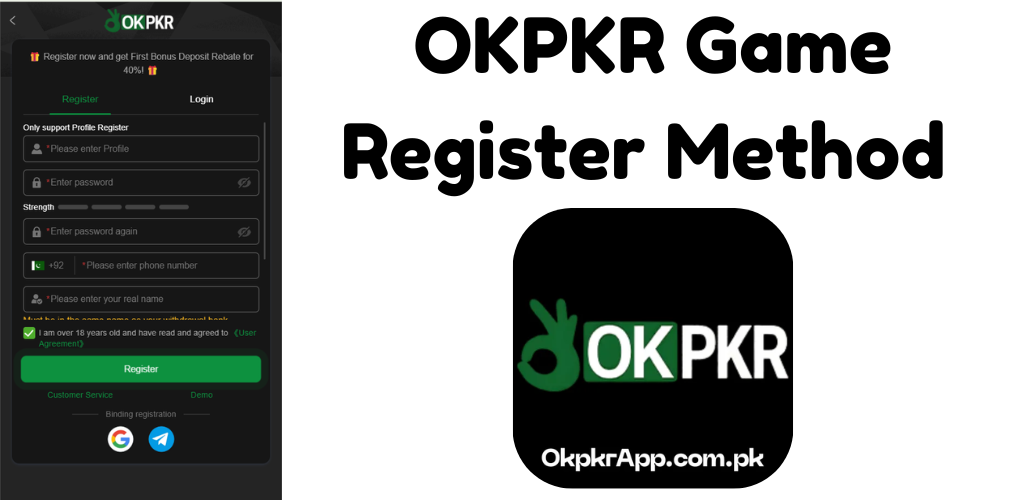
Enter Your Profile Name
The first field asks for your Profile Name. This is the username that will appear on your account and leaderboard. Choose something unique and memorable. The platform only supports Profile Register — social media style handles or real-name based usernames both work fine here.
Create a Strong Password
The second field is for your password. Enter a secure combination that you have not used on other platforms. Retype it in the third field labeled Enter password again to confirm. A password strength indicator labeled Strength sits between the two password fields — aim for at least a medium to strong rating before moving forward.
Enter Your Pakistani Phone Number
The phone number field is pre-set with the +92 Pakistan country code and a Pakistani flag icon. Enter your mobile number after the country code. This number will be used for account recovery and customer support verification, so use a number you actively have access to.
Enter Your Real Name
This is the most important field in the entire ok pkr register process. Type your full legal name in UPPERCASE. A yellow warning below this field reminds you: “Must be the same name as your withdrawal bank.” If you enter a nickname or abbreviation here, your withdrawal request will be rejected until the name is corrected through customer support — a process that takes extra time.
Confirm Age and Accept User Agreement
Check the green checkbox that reads: “I am over 18 years old and have read and agreed to the User Agreement.” Tapping the User Agreement link opens the full platform terms. Registration is not possible without checking this box.
Tap the Green Register Button
Once all fields are filled correctly, tap the large green Register button at the bottom. Your account is created instantly and you are logged in automatically.
Quick Register Options — Google and Telegram
At the bottom of the okpkr game register screen, two alternative sign-up methods are available:
- Google — links your existing Google account to a new OKPKR profile
- Telegram — registers using your Telegram account for instant access
Both options are labeled under Binding Registration and are ideal for players who prefer not to remember a separate password. However, if you use these methods, make sure to still complete your real name in your profile settings before making a withdrawal request.
What Happens Immediately After OKPKR Register
As soon as you complete the okpkr apk register process, several things happen automatically:
40% First Deposit Rebate Activates — This welcome rebate applies to your very first deposit only. The higher your first deposit, the bigger the rebate.
Welcome Bonus Unlocks — New members qualify for a tiered first deposit bonus ranging from Rs 20 for a Rs 200 deposit up to higher rewards for larger first deposits.
VIP Journey Begins — Your account starts at VIP 0. A deposit of just Rs 100 moves you to VIP 1, which unlocks weekly and monthly salary bonuses on top of all game winnings.
Daily Bonus Access Opens — From the first day of registration, you can claim red envelope bonuses, participate in the daily deposit tournament, and earn from the mysterious daily bonus system.
Common Registration Mistakes to Avoid
Wrong name format — Always use UPPERCASE for your real name. Even a lowercase letter can cause a mismatch with your bank or mobile wallet.
Using a temporary phone number — Your +92 number is tied to your account permanently for recovery purposes. Do not use a number you do not own or will lose access to.
Weak password — The platform handles real money. Use a strong, unique password and enable account recovery through your phone number to keep your balance safe.
Skipping the User Agreement — The checkbox is mandatory. Read the key terms so you understand turnover requirements attached to bonuses before depositing.